EBU R128 loudness
Every audio stream now reports integrated loudness, loudness range and true peak — measured from the audio itself, with a short-term loudness curve.
Native macOS app · Universal binary
Complete codec and stream metadata, real frame thumbnails, bitrate graphs, fixity checksums, and polished PDF reports — everything a media file has to tell, one drag and drop away.
Requires macOS 14 or later · Apple silicon & Intel
What's new
Loudness metering, measured HDR light levels, full Dolby Vision colour, automatic analysis, and the essentials of every stream at a glance.
Every audio stream now reports integrated loudness, loudness range and true peak — measured from the audio itself, with a short-term loudness curve.
MaxCLL and MaxFALL are measured from the picture and shown next to the values the file declares, with a brightness timeline for the whole programme.
Profile 5 files decode through the full Dolby Vision pipeline, so previews and thumbnails show true colour instead of the magenta cast other tools display.
Thumbnails from HDR sources display with real highlight range on HDR displays, and are tone-mapped correctly everywhere else.
Every stream tab opens with the essentials — format, resolution, channels, bit rate, language, duration — so the basics never need a scroll.
Switching between feature-length files is instant, live resizing stays smooth however much is on screen, HDR analysis is about ten times faster, and thumbnails arrive in a third of the time.
Two opt-in switches run the measurements for you the moment a file opens: waveform, loudness and bitrate for every audio stream, HDR light levels for every video stream — cards already open.
Hover any timeline chart and a dotted cursor shows the exact timecode at that point — spot something odd on a waveform and know precisely where to look.
Drop in a file and get an instant, beautifully organized breakdown of what it really contains.
Container, video, audio, subtitle, chapter, and image streams — codecs, profiles, bit rates, color primaries, HDR, chroma, languages, and more.
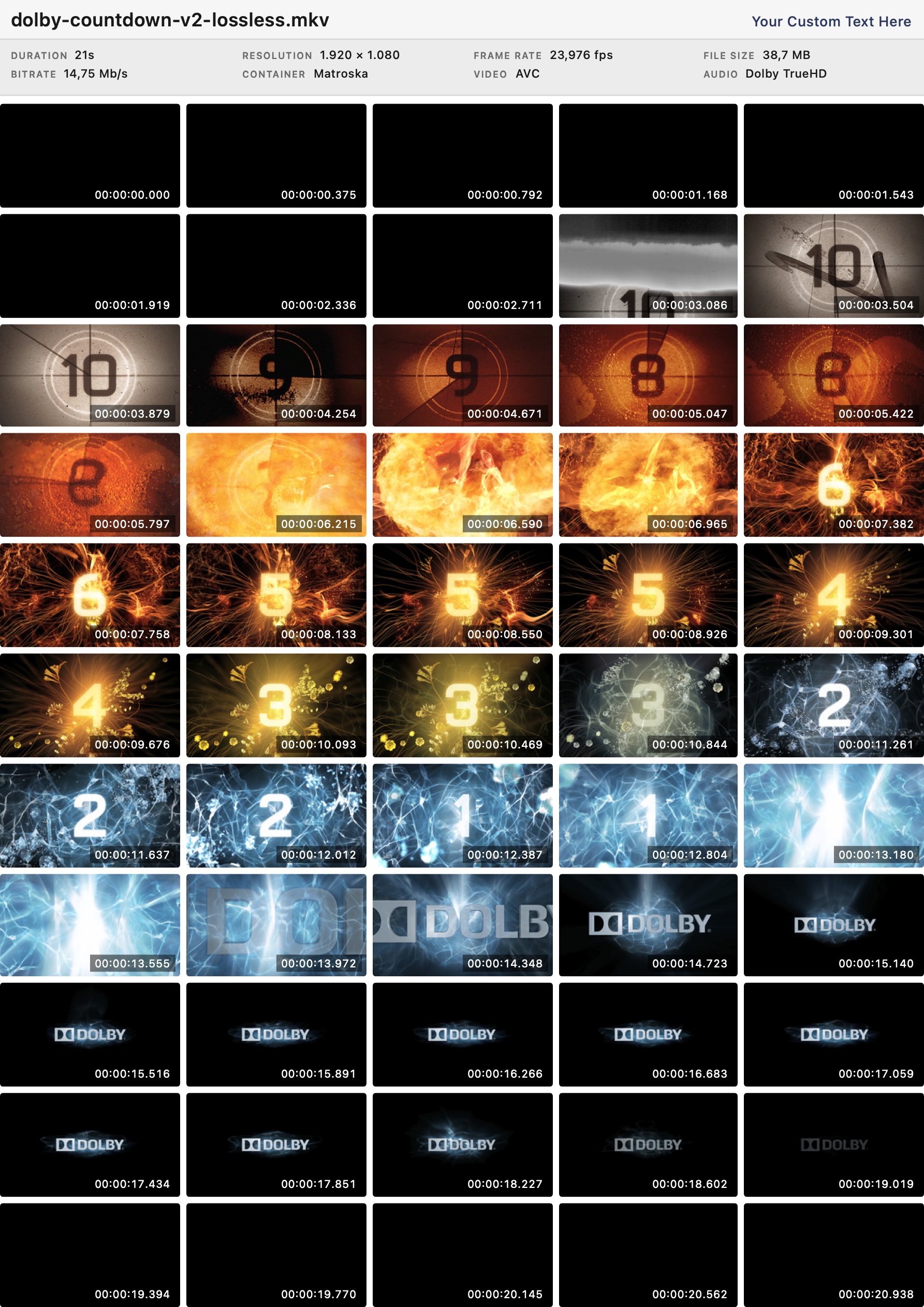
A grid of real frames decoded straight from the video stream, evenly spread across the timeline, with optional timecodes.
Embedded artwork is extracted losslessly from the container, displayed beside the metadata, and saved back to disk in its original bytes.
Branded vector templates — a full archival report or a classic contact sheet, with your logo and custom fields. Export PDF or image, or print.
Fully sandboxed and 100% offline. No analytics, no network access — your files never leave your Mac.
A modern SwiftUI app built for Apple silicon and Intel. Fast, light, and at home on macOS.
Fully localized in English, German, Spanish, Portuguese (Brazilian and European), Russian, Japanese, and Simplified Chinese.
Every property MediaInfo knows, with per-stream toggles for what shows on screen and what makes it into printed reports.
Open a whole folder's worth of files — each stays in the sidebar with its format badges, one click from comparison.
One pass charts every stream's bitrate plus the container total — spot VBR spikes, starved sections, and encoding problems at a glance.
MD5 and SHA-256 computed in a single streaming pass — copy them, print them on reports, and carry them in every export.
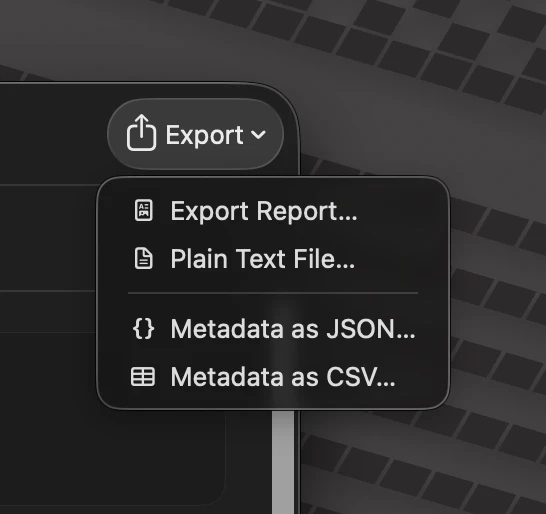
Machine-readable metadata with raw and formatted values and stable keys — ready for MAM ingest, catalogs, and spreadsheets.
Integrated loudness, loudness range and true peak, measured from the audio to ITU-R BS.1770-4 — with a short-term curve for the whole programme.
MaxCLL and MaxFALL measured from the picture and compared with what the file declares — across HDR10, HLG and Dolby Vision.
Flip two switches and every file measures itself on open — audio waveform, loudness and bitrate, video HDR light levels — with the results already on screen.
Metadata
Media Inspector reads what's actually inside the container — every stream, every property — and formats each value the way humans read it: Mb/s, timecodes, byte sizes, dates.
Audio
Every audio stream draws a waveform with one lane per channel — and Media Inspector measures its loudness to the EBU R128 standard from the decoded audio itself, never from metadata.
HDR & Dolby Vision
Media Inspector decodes the picture and measures its real light levels — MaxCLL and MaxFALL in nits — then shows them next to the values the file declares. When an encoder ships zeros or boilerplate, you see it immediately.
Conformance
Describe what your files are supposed to be — codec, resolution, frame rate, channels — and every open file gets a pass/fail verdict, with failures explaining exactly what was found versus what was expected.
The policy editor: every rule composed from menus — severity, stream scope, property, operator, value. Policies are shareable files.
Thumbnails
Frames are decoded directly from the video stream itself — no guesswork, no proxies — and laid out on an adjustable grid with frame-accurate timecodes.
Comparison
Select two or three files and the inspector becomes a diff: every property side by side, streams paired automatically, and only the real differences highlighted.
Reports
Turn any inspection into a crisp, vector PDF. Pick a template, tune it with live preview, then export as PDF or image, or print — every template renders true vector output, not screenshots.
Exports
Reports are for people; exports are for pipelines. Every inspection leaves the app in whichever shape the next tool needs.
macOS Integrations
Open anything straight from Finder, and drive batch analysis, reports and checksums from native Shortcuts actions.
Archives & collections
Archival facilities, film and tape archives, post houses, and serious collectors — Media Inspector turns every ingest into documentation you can file, print, and trust.
Add your own fields to every report — facility, original media, catalog number, barcode — and they render as a dedicated card right below the file summary.
Confirm a digitization came out right — codec, bit rate, bit depth, color, HDR metadata — then seal it with MD5/SHA-256 fixity checksums before the source tape goes back on the shelf.
Contact sheets give each asset a recognizable face — spot the right master at a glance and catch corrupted or black frames without scrubbing.
Company name and logo on every page, plus a custom header line — reports look like they came from your facility, because they did.
Export a vector PDF for the digital catalog, a high-resolution image for the MAM or the tape box, or print it and drop it in the physical file.
Fully offline and sandboxed — nothing is uploaded, ever. Use it on air-gapped ingest stations and restricted facility networks with confidence.
Both examples below were generated by Media Inspector from the same Matroska file — download the originals to judge the full quality.
Media Inspector is fully sandboxed and works completely offline. It has no network access, collects no analytics, and phones home to no one. Everything happens on your machine — as it should.
Read the privacy policy →Everything its FFmpeg and MediaInfo engines can parse: MP4, MOV, MKV, WebM, AVI, MXF, MPEG-TS, and DVD-Video among the containers, with video codecs from H.264, HEVC, AV1, ProRes and VP9 to MPEG-2, and audio from Dolby TrueHD, Dolby Digital and DTS-HD to AAC, FLAC, Opus, MP3 and PCM. If a file plays somewhere, Media Inspector can almost certainly dissect it.
Media Inspector is built on MediaInfoLib — the same open-source engine behind MediaInfo — wrapped in a fully native macOS app. It also goes beyond metadata: real decoded frame thumbnails, embedded cover-art extraction, and branded, print-ready PDF reports.
No. Media Inspector is fully sandboxed and works completely offline — it has no network access, no analytics, and no telemetry. Everything is analyzed locally on your machine.
Yes. The Thumbs Sheet report template lays real decoded frames on a page with frame-accurate timecodes and a file summary header, and exports as a vector PDF or a high-resolution JPEG image — ready for a MAM system, a catalog, or a printed folder.
Over 1,500 properties across container, video, audio, subtitle, chapter and image streams. You choose per stream type which properties appear on screen and which are included in printed reports.
Yes. Media Inspector computes MD5 and SHA-256 in a single streaming pass — on demand or automatically on open — shows them on the Container tab, prints them on the archival report's Fixity card, and includes them in JSON and CSV exports.
Yes. A single pass over the file charts the bitrate of every stream plus the container total — the combined graph on the Container tab, per-stream graphs on the Video and Audio tabs — and the graph can be included on the archival report.
Yes. Alongside PDF and plain-text reports, every inspection exports as machine-readable JSON (raw and formatted values with stable keys) or a flat CSV — ready for MAM ingest, catalogs, and spreadsheets.
It turns every ingest into filing-ready documentation. The archival report template combines full per-stream metadata — enough to verify that a digitization came out right before the source tape goes back on the shelf — with custom provenance fields, your facility's branding, and optional thumbnail pages. The contact sheet gives every asset a recognizable visual fingerprint for the catalog, and both export as archivable PDF or image.
Yes. Reports print your company name and logo on every page, plus an editable header line and a custom-fields card with a title of your choosing — name the fields anything your workflow needs (Facility, Original Media, Catalog Number, Barcode…) and their values render right below the file summary. Your template settings persist, so a whole collection gets consistent documentation.
Yes. Media Inspector has no network capability at all — analysis, reports, and exports all happen locally, so it behaves identically on ingest stations and QC workstations that never touch the internet. Nothing is uploaded, logged, or phoned home.
Media Inspector requires macOS 14 (Sonoma) or later and runs natively on both Apple silicon and Intel Macs. The app is localized in English, German, Spanish, Portuguese (Brazilian and European), Russian, Japanese, and Simplified Chinese.
Yes. It ships four native Shortcuts actions — Analyze Media File (to JSON or CSV), Generate Report (to a branded PDF, optionally using a saved preset), Compute File Checksum (MD5 or SHA-256), and Open in Media Inspector. Chain them into your own workflows, run them from a Finder right-click as Quick Actions, or drive them from automations — all without opening the app.
Yes — the actions are batch-aware. Select many files and run a Quick Action, or hand a whole folder to a shortcut, and Media Inspector produces one report, export, or checksum per file in a single pass. A whole tape collection or ingest batch becomes a single command instead of an afternoon of clicking.
Yes. The Generate Report Shortcuts action renders the same branded PDF as the app — using a report preset you have saved — entirely in the background. Trigger it from a Finder Quick Action, a keyboard shortcut, or a folder-based automation, and the finished PDFs land wherever you point them.

The complete media analyzer for your Mac — available now on the Mac App Store.
Requires macOS 14 (Sonoma) or later · Universal binary for Apple silicon and Intel